
Notebook Lite - Take Notes & Handwriting1.0 - App Store
You'll be able to see results in few seconds.
Publisher Description
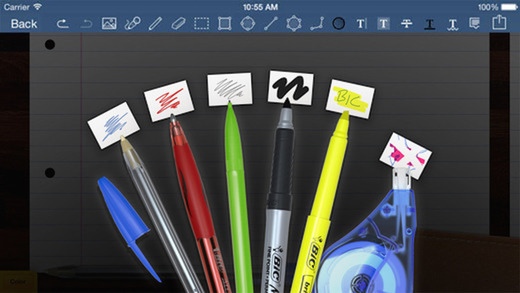
Notebook Pro lets you take beautiful handwritten notes and annotate PDFs. You can also type your notes, record audio, draw shapes, sketch ideas, sign contracts, fill forms, print documents, and more right on your iPad. Syncs with Evernote and works with all popular cloud services such as Dropbox, Google Drive and Box.
Notebook Pro offers the most beautiful handwriting on the app store - this is one of the key reasons why our users fall in love with Notebook Pro.
GORGEOUS HANDWRITING
Feel the fluidity and smoothness of our pens, pencils and highlighters that rival the real ones.
Our unique ink pens produce a beautiful calligraphic effect that makes your handwriting look great.
MANY OPTIONS TO CHOOSE FROM
Choose from a selection of 70 tastefully designed notebook covers, ranging from classic leathers to fun stripes and florals.
Our extensive paper template library offers papers for all your needs from simple ruled papers to special day planners and workout logs.
Turn the personalization a notch by changing your shelf themes to suite your choice of notebook covers.
KEEP IT ORGANIZED
Create as many notebooks as you wish for various purposes like meeting notes, journals, sketches, project work, class notes.
Neatly group related notebooks by just dragging and dropping them on one another.
Organize pages inside and across notebooks with ease.
SECURE YOUR NOTES
Add a passcode to protect important and sensitive notes.
Automatically backup your notes to Dropbox
Use our proprietary AirTransfer to archive and share your notes
EASY SHAPES
Tap on the "shapes tool" on the pen rack and see your pen strokes magically transform into shapes.
Draw perfectly geometrical shapes such as circles, triangles, squares, etc. to your notes.
AUDIO RECORDING
Record lectures, meetings and discussions while taking notes.
Playback recordings anytime you want.
Add multiple recordings and keep them safe right next to your notes.
WRITE WITH EASE
Zoom in to your notes for a more close-up and detailed writing.
Add photos to your notes, artworks, recipes, diaries & more.
Offers left-handed and other 5 more writing modes to meet everyones writing style.
MARK UP & PRINT DOCUMENTS
Open-in and import PDF and Microsoft Office documents as notebooks in Notebook Pro.
Highlight and underline key information in your documents.
Sign and print contracts straight from your iPad.
SYNC & SHARE
Automatically sync and access all your notebooks via your Evernote account from any device.
Quickly share pages via Email, Twitter or Facebook.
Send your notes to Dropbox, Evernote, Google Drive for archival or sharing with classmates, colleagues or clients.
Showcase your lecture notes, diagrams, ideas & more using a projector. Notebook Pro offers a special whiteboard mode for this purpose.
STYLUS SUPPORT
Any iPad stylus will work great with Notebook Pro.
For more advanced features such as pressure sensitivity and palm rejection, use stylus from one of our partners: Pencil by FiftyThree, POGO Connect, Hex Jaja, Adonit Script, Adonit JOT Touch, Wacom Intuos Creative Stylus & Bamboo Stylus Fineline
Requires iOS 7.0 or later. Compatible with iPhone, iPad, and iPod touch.
About Notebook Lite - Take Notes & Handwriting
The company that develops Notebook Lite - Take Notes & Handwriting is ZHANG HUAYI. The latest version released by its developer is 1.0.
To install Notebook Lite - Take Notes & Handwriting on your iOS device, just click the green Continue To App button above to start the installation process. The app is listed on our website since 2016-07-01 and was downloaded 0 times. We have already checked if the download link is safe, however for your own protection we recommend that you scan the downloaded app with your antivirus. Your antivirus may detect the Notebook Lite - Take Notes & Handwriting as malware if the download link is broken.
How to install Notebook Lite - Take Notes & Handwriting on your iOS device:
- Click on the Continue To App button on our website. This will redirect you to the App Store.
- Once the Notebook Lite - Take Notes & Handwriting is shown in the iTunes listing of your iOS device, you can start its download and installation. Tap on the GET button to the right of the app to start downloading it.
- If you are not logged-in the iOS appstore app, you'll be prompted for your your Apple ID and/or password.
- After Notebook Lite - Take Notes & Handwriting is downloaded, you'll see an INSTALL button to the right. Tap on it to start the actual installation of the iOS app.
- Once installation is finished you can tap on the OPEN button to start it. Its icon will also be added to your device home screen.
Program Details
System requirements
Download information
Pricing
Version History
version 1.0
posted on 2016-07-01
Disclaimer
Official App Store Link
We do not host Notebook Lite - Take Notes & Handwriting on our servers. We did not scan it for viruses, adware, spyware or other type of malware. This app is hosted by Apple and passed their terms and conditions to be listed there. We recommend caution when installing it.
The App Store link for Notebook Lite - Take Notes & Handwriting is provided to you by apps112.com without any warranties, representations or guarantees of any kind, so access it at your own risk.
If you have questions regarding this particular app contact the publisher directly. For questions about the functionalities of apps112.com contact us.
